
AI Integration Overview
Overview
Testany provides AI integration capabilities that allow you to manage tests, pipelines, and executions through AI assistants like Claude Code, GitHub Copilot, VS Code Copilot, and other MCP-compatible tools.
Architecture
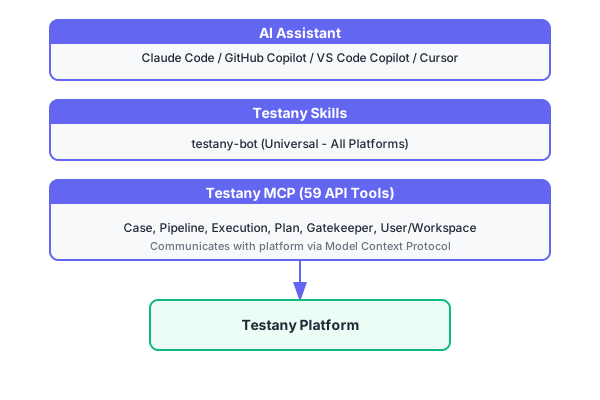
Components
| Component | Purpose | Description |
|---|---|---|
| Testany MCP | API Tools | Provides 59 atomic operations for test management via Model Context Protocol |
| Testany Skills | Domain Knowledge | Guides AI assistants on how to use MCP tools effectively |
Skill Plugin
Testany provides testany-bot, a universal skill plugin that works across all platforms:
| Plugin | Architecture | Compatibility |
|---|---|---|
| testany-bot | Self-contained Skills | All platforms (Claude Code, GitHub Copilot, VS Code Copilot, Cursor, etc.) |
testany-bot
- Uses standard
nameanddescriptionfrontmatter - Works with any AI assistant that supports Agent Skills specification ↗
- Simple, self-contained architecture
- Recommended for all users, including Claude Code users
Supported AI Assistants
| Assistant | MCP | testany-bot |
|---|---|---|
| Claude Code | ✅ | ✅ |
| GitHub Copilot | ✅ | ✅ |
| VS Code Copilot | ✅ | ✅ |
| Cursor | ✅ | ✅ |
Available Skills
Both plugins provide the same 6 skills:
| Skill | Description | Example |
|---|---|---|
/case | Test case management | Create, edit, configure test cases |
/pipeline | Pipeline orchestration | Build pipelines, configure relay |
/tests | Test execution | Execute pipelines, monitor results |
/debug | Failure analysis | Analyze failures, view logs |
/orchestrator | Test orchestration | Gatekeepers, scheduled plans, CI/CD |
/workspace | Workspace management | Team and permission management |
What You Can Do
With AI integration, you can use natural language to:
- Create and configure test cases - "Create an API test for the login endpoint"
- Build test pipelines - "Combine these 3 test cases into a regression pipeline"
- Execute and monitor tests - "Run the smoke test pipeline and show me the results"
- Debug failures - "Why did this execution fail? Show me the logs"
- Set up CI/CD - "Create a quality gate for production deployments"
- Manage workspaces - "Add the new team member to the QA workspace"
Next Steps
- Quick Start - Get up and running in 5 minutes
- Resources - GitHub repos, documentation, and support
Still have questions?
Our team is here to help. Get in touch and we'll get back to you as soon as possible.