
Understanding Statuses on Testany Platform: Your Comprehensive Guide
Navigating the Testany Platform becomes a breeze when you understand the various statuses that your test cases and test pipelines can be in. This guide aims to provide you with clear and comprehensive definitions of each status so you can manage your testing activities more effectively.
Note: The voice in this video is AI-generated, not original.
Test Case Statuses
1. Registered
- What It Means: Your test case has been successfully uploaded to the Testany Platform.
- Recommended Action: Feel free to include this test case in your test pipelines.
2. Used by
-
Legend:
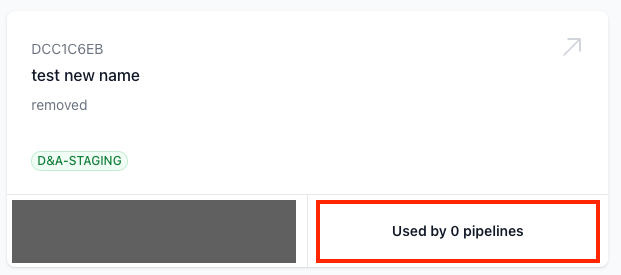
-
What It Means: Indicates how many test pipelines this test case is assembled into. Note that this number only includes the count of pipelines that currently have this test case assembled. Pipelines that had this test case assembled in the past but do not currently include it are not counted.
-
Recommended Action: No immediate action is needed.
Test Case Statuses in Execution
1. Running
-
Legend:

-
What It Means: This test case is actively being executed within a test pipeline.
-
Recommended Action: Please wait for the execution to conclude.
2. Passed
-
Legend:

-
What It Means: The test case was executed flawlessly, meeting all the specified conditions and assertions.
-
Recommended Action: No immediate action is needed.
3. Failed
-
Legend:

-
What It Means: Unfortunately, the test case execution did not get expected one or more assertion successfully OR Check whether, for some reason, the test case failed to complete execution within the platform's specified time (2 minutes).
-
Recommended Action: Examine the logs to identify issues from software being tested or test script and make the necessary adjustments.
4. Fail as Expected
-
Legend:

-
What It Means: The test case failed, but this was the expected outcome based on the test pipeline logic. A failure here actually leads to the success of the test pipeline.
-
Recommended Action: No immediate action is needed unless this status is unexpected.
5. Not Start
-
Legend:

-
What It Means: This test case, although part of a triggered test pipeline, has not yet begun its execution.
-
Recommended Action: Please wait for the test pipeline to initiate this specific test case.
6. Skipped
-
Legend:

-
What It Means: Due to the logic set in the test pipeline, this test case will not be executed.
-
Recommended Action: If this status is unexpected, review the logic set in the test pipeline.
7. Error
-
Legend:

-
What It Means: The test was executed, but due to reasons not related to the test script or the program under test, the test results could not be obtained (e.g. network failure between Runtime and the software under test). In such cases, the status of the test case will be set to "Error."
-
Recommended Action:
- Check if the runtime in which the case is running is currently not in an Operational state.
- Visit https://testany.statuspage.io ↗ to check the platform service status.
- If the issue still cannot be determined, create a support ticket to Testany support.
Test Pipeline Statuses
1. Assembled
- What It Means: Your test pipeline is fully set up and ready to roll.
- Recommended Action: You can proceed to execute this test pipeline.
Test Execution Statuses
1. Not Started
-
Legend:

-
What It Means: This pipeline has already entered the execution queue but has not yet started execution.
-
Reason: TEE resource constraints.
-
Recommended Action: Continue to wait or cancel this execution.
2. Running
-
Legend:

-
What It Means: The test pipeline is in the process of executing its test cases.
-
Recommended Action: Keep an eye on the progress and wait for it to finish.
3. Success
-
Legend:

-
What It Means: The test pipeline executed all its test cases without a hitch.
-
Recommended Action: Take a moment to review the results and logs for insights.
4. Failure
-
Legend:

-
What It Means: The test pipeline executed completely but there's one or more test case didn't get expected assertion successfully.
-
Recommended Action: Investigate the logs to pinpoint issues and make the required adjustments.
5. Cancelled
-
Legend:

-
What It Means: The test pipeline execution has been cancelled.
-
Recommended Action: Review the reason for cancellation and decide on the next steps.
6. Error
-
Legend:

-
What It Means: If any subordinate case within the pipeline has an execution status of "error" during the pipeline's execution, the result status of the pipeline will be marked as "error."
-
Recommended Action:
- Check Runtime Status: Verify if the Runtime executing your test cases is operational.
- Navigate to Workspace Settings → Credential tab
- Ensure the Runtime status shows as "Operational"
- Check Network Connectivity: Verify network connectivity between the Runtime and your System Under Test (SUT).
- If testing internal services, ensure the Runtime has proper network access
- Check firewall rules and VPN connections if applicable
- Check Platform Status: Visit https://testany.statuspage.io ↗ to check if there are any ongoing platform incidents.
- Review Error Logs: Click on the failed test case to view detailed error logs, which may provide specific information about the failure cause.
- Contact Support: If the issue persists after the above checks, create a support ticket with the execution details at https://testany.io/contact#support ↗.
- Check Runtime Status: Verify if the Runtime executing your test cases is operational.
Developer Reference: Status Code Mapping
If you are developing applications that integrate with the Testany Platform (such as CI/CD integrations, webhook handlers, or automation scripts), here is the numeric mapping table for execution statuses:
Execution Status Codes
| Status Name | Status Code | Description | Terminal State |
|---|---|---|---|
| NOT_STARTED | -1 | Not started / In queue | No |
| RUNNING | 0 | Currently executing | No |
| SUCCESS | 1 | All passed | Yes |
| FAILURE | 2 | Has failures | Yes |
| SKIPPED | 3 | Skipped (Test Case only) | Yes |
| FAIL_AS_EXPECTED | 4 | Failed as expected (Test Case only) | Yes |
| CANCELLED | 5 | Cancelled | Yes |
| ERROR | 99 | System error | Yes |
Usage Examples
Check if execution is complete:
Python# List of terminal status codes TERMINAL_STATUSES = [1, 2, 3, 4, 5, 99] def is_execution_complete(status_code): return status_code in TERMINAL_STATUSES
Check if execution is successful:
Python# Success status codes (both SUCCESS and FAIL_AS_EXPECTED are considered successful) SUCCESS_STATUSES = [1, 4] def is_execution_successful(status_code): return status_code in SUCCESS_STATUSES
API Response Example
When you query execution status via API, the status field in the response will return these numeric values:
JSON{ "execution_id": "Y2K-0001A-0000B", "status": 1, "status_name": "SUCCESS", "...": "..." }
By familiarizing yourself with these statuses, you'll be better equipped to manage your test cases and pipelines on the Testany Platform, ensuring a smooth and efficient testing experience.
Still have questions?
Our team is here to help. Get in touch and we'll get back to you as soon as possible.