
Managing Test Pipeline
Overview
Understanding a Qualified Test Pipeline
A qualified test pipeline is a series of automated tests executed according to defined order, conditions, and dependencies to validate the functionality, performance, and security of an application. A well-designed test pipeline should be comprehensive, efficient, and maintainable. It should cover various aspects of the application, from unit tests to integration and end-to-end tests, ensuring that the software is robust and ready for production.
Test Pipeline on Testany Platform
Understanding the Concepts of Test Pipeline on Testany Platform
Definition
In our product, a "Test Pipeline" is a feature for implementing automated testing. It consists of a series of predefined automated testing cases that are triggered by various test frameworks and can be executed according to defined order, conditions, and dependencies. The goal of the Test Pipeline is to continuously verify the quality and performance of the product or system. Each Execution produces test results, which can be reviewed in "Executions" and pushed to Watchers.
Test Pipeline YAML
Testany Platform uses YAML files to define the structure, dependencies, and execution logic of a test pipeline. For all new pipelines, kind: rule/v1.3 is the recommended version. rule/v1.2 is retained only for backward compatibility and does not provide case-level parallel execution. Please read the Test Pipeline Writing Guideline and Samples.
Assemble Test Pipeline
-
Select a workspace: from the 'workspace' dropdown list at the top bar .
-
Navigate to the Pipeline Section: Go to the 'Pipelines' tab on the left-side bar.
-
Assemble a New Pipeline: Click on the 'Assemble pipeline' button at the top right corner of the page.
-
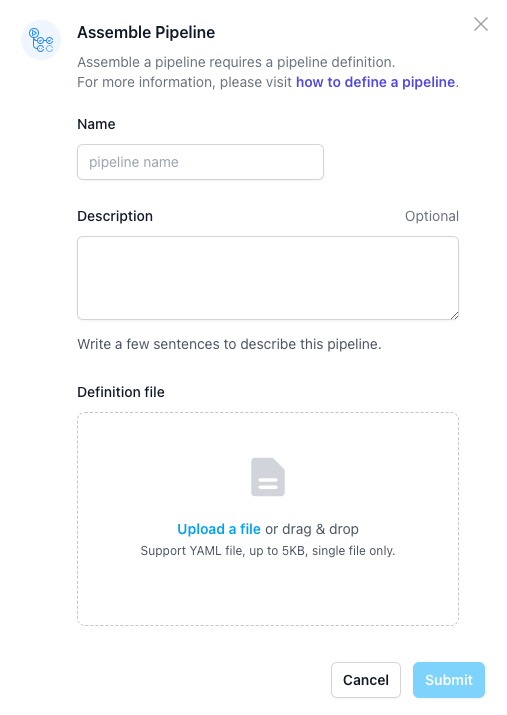
Key in necessary information: include name (mandatory), description (optional), etc.
-
Upload test pipeline YAML: Drag and drop the .yaml file to the 'Definition file' box, then click on 'Submit' button
-
Review tese pipeline meta: include env., flow diagram and test case list. If all right, click on 'confirm' to complete assembling the pipeline.
Please note the platform will allocate a pipeline key for you in the format of {workspace key}-{4-5 uppercase hex digits}. Newly created pipelines typically use 5 digits with leading zeros (e.g., Y2K-0001A). This key is the unique ID of this pipeline on Testany Platform. You may check the key in pipeline list and pipeline detail page. This key is very important.
Read Test Pipeline
- Access Existing Pipelines: Navigate to the 'Pipelines' tab to see a list of all your existing pipelines.
- Select a Pipeline: Click on the pipeline you wish to read.
- View Details: The platform will display the structure, test cases involved, and the sequence in which they are executed.
Update Test Pipeline
Please note: only the owner or a Workspace Admin can update the pipeline.
- Select Pipeline to Update: Go to the 'Pipelines' tab and click on the pipeline you want to update.
- Repeat #4-6 in the 'Assemble test pipeline' section.
Transfer Ownership
If you need to hand over a pipeline to another user, the current owner or a Workspace Admin can transfer ownership.
- Navigate to the pipeline detail page.
- In the Details panel on the right side, find the Owned by field and click on the current owner's name.
- A search box will appear. Type to search for the new owner, then select them from the list.
- Click Confirm to complete the transfer.
After the transfer, the new owner will have full control over the pipeline (edit, delete, trigger execution), and the previous owner will lose edit and delete permissions (unless they are a Workspace Admin).
By understanding and effectively managing test pipelines on the Testany Platform, you can ensure that your software is rigorously tested, reliable, and ready for deployment in any environment.
×
Still have questions?
Our team is here to help. Get in touch and we'll get back to you as soon as possible.