
Event-Driven Testing Automation
Turn Any Event into Automated Quality Assurance
Modern software systems don't operate in isolation—they respond to deployments, alerts, incidents, and external service changes. Your testing strategy should too. Event-driven testing automation transforms your QA process from a manual gate into an intelligent, responsive system that triggers the right tests at the right time.
Testany provides a complete event-driven testing ecosystem through three integrated components:
| Component | Direction | Purpose |
|---|---|---|
| Gatekeeper | Webhook-In | Receive external events, trigger tests automatically |
| Plan | Scheduled | Time-based recurring test execution |
| Webhook Dispatch | Webhook-Out | Send test results to downstream systems |
This guide shows you how to combine these components to build fully automated testing workflows that respond to real-world events—no manual intervention required.
Who should read this guide:
- DevOps engineers integrating testing into CI/CD pipelines
- QA leads designing automated testing strategies
- Platform architects building event-driven quality systems
- Operations teams implementing incident-driven diagnostics
The Testany Event-Driven Ecosystem
Understanding the Three Pillars
Testany's event-driven architecture is built on three complementary components that work together to create a complete automation loop:
1. Gatekeeper (Webhook-In)
Gatekeeper receives incoming webhooks from external systems and triggers test pipeline execution. When your CI/CD system deploys code, when your monitoring detects anomalies, or when a third-party service reports issues, Gatekeeper automatically initiates the appropriate tests.
Key capabilities:
- Receives webhooks from any HTTP-capable system
- Triggers predefined test pipelines
- Processes events from CI/CD, monitoring, third-party statuspages, and more
Plan provides time-based test scheduling for recurring quality checks. Use it for nightly regression suites, hourly health checks, or weekly security scans—tests that should run on a predictable cadence regardless of external events.
Key capabilities:
- Cron-style scheduling (hourly, daily, weekly, custom)
- Multiple test pipelines per plan
- Consistent execution timing for compliance and auditing
3. Webhook Dispatch (Webhook-Out)
Webhook Dispatch sends test results to downstream systems after execution completes. Route results to Slack for team notifications, Jira for ticket creation, PagerDuty for escalation, or any system that accepts webhooks.
Key capabilities:
- Configurable per Plan or Gatekeeper
- Structured JSON payload with full execution details
- Supports any webhook-compatible endpoint
Architecture Overview
The following diagram illustrates how these components work together:
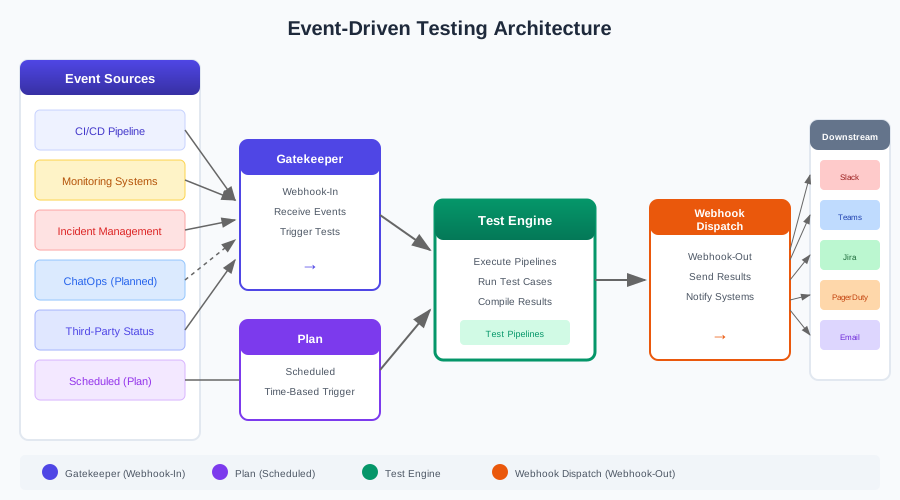
Event Flow:
- Event Sources → External systems generate events (deployments, alerts, commands, status changes)
- Gatekeeper → Receives webhooks and triggers appropriate test pipelines
- Plan → Alternatively, scheduled plans trigger tests at defined intervals
- Test Engine → Executes the configured test pipelines
- Webhook Dispatch → Sends results to downstream notification and ticketing systems
Complete Event Lifecycle
Every test execution in Testany follows this lifecycle:
- Event Reception: Gatekeeper receives an incoming webhook OR Plan triggers at scheduled time
- Validation: The trigger is validated and matched to configured test pipelines
- Pipeline Trigger: Matched pipelines are queued for execution
- Test Execution: Test cases run on configured runtimes
- Result Processing: Execution results are compiled and status determined
- Result Dispatch: Configured webhooks receive the execution payload
- Downstream Actions: External systems process results (notifications, tickets, escalations)
Testany vs Traditional CI/CD Testing
The Paradigm Shift
Traditional CI/CD testing follows a "build-then-test" model: code is committed, built, and tested in sequence. While effective for code-change validation, this approach has limitations:
- Limited trigger sources: Tests only run on code commits
- No operational integration: Monitoring alerts don't trigger diagnostic tests
- Siloed results: Test outcomes stay within CI dashboards
- Manual incident response: Production issues require human intervention to initiate testing
Testany enables event-driven continuous testing: tests respond to any system event, not just code changes. Your monitoring alerts can trigger diagnostic tests. Third-party dependency status changes can trigger integration validation. Future releases will also support native ChatOps integration.
Feature Comparison
| Capability | Traditional CI/CD | Testany Event-Driven |
|---|---|---|
| Trigger Sources | Code commits only | Any webhook event |
| Monitoring Integration | Requires separate toolchain | Native via Gatekeeper |
| Incident Response | Manual test initiation | Auto-triggered diagnostics |
| ChatOps | Plugin-dependent, complex setup | Integrable via Gatekeeper webhook (native support planned) |
| Scheduled Testing | Cron jobs, separate from CI | Integrated Plan feature |
| Result Distribution | CI dashboards only | Any webhook endpoint |
| Third-Party Dependencies | No standard approach | Statuspage webhook integration |
When to Use Each Approach
Use CI/CD testing for:
- Build verification
- Unit and integration tests tied to code changes
- Pre-merge quality gates
Use Testany event-driven testing for:
- Post-deployment smoke tests
- Production health monitoring
- Alert-triggered diagnostics
- Scheduled regression and compliance testing
- Third-party dependency validation
- On-demand ChatOps testing (requires custom integration, native support planned)
The two approaches are complementary. Many teams use CI/CD for pre-deployment testing and Testany for production-stage and operational testing.
Choosing Your Trigger Strategy
Decision Framework
Use this decision tree to select the right trigger mechanism:
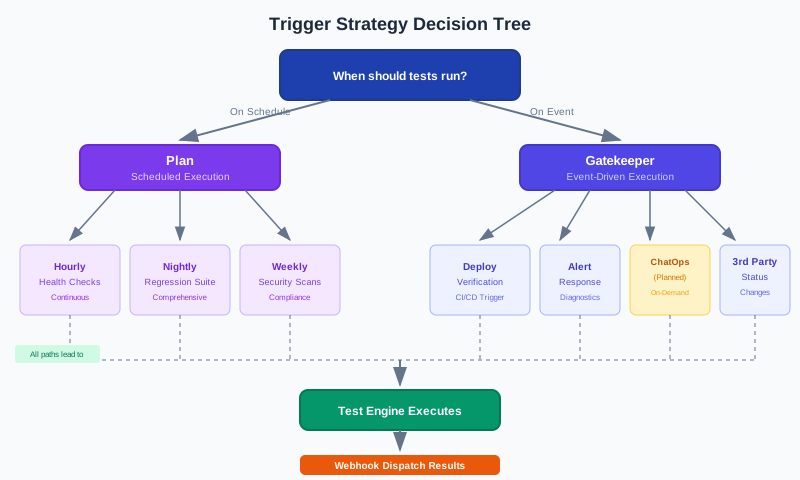
When to use Plan (Scheduled):
- Tests should run at consistent intervals
- No external event initiates the need
- Compliance or audit requirements dictate regular testing
- You need predictable execution times for reporting
When to use Gatekeeper (Event-Driven):
- Tests should respond to external system events
- Timing depends on when events occur
- You need immediate feedback after changes
- Tests serve as diagnostic or validation tools
Scenario Selection Matrix
| Scenario | Plan | Gatekeeper | Rationale |
|---|---|---|---|
| Nightly regression suite | ✓ | Predictable schedule, comprehensive coverage | |
| Post-deployment smoke tests | ✓ | Immediate validation after each deploy | |
| Hourly production health checks | ✓ | Continuous monitoring at fixed intervals | |
| Alert-triggered diagnostics | ✓ | Respond to monitoring anomalies | |
| ChatOps on-demand testing | ✓ | Team-initiated via Slack/Teams commands (requires custom integration, native support planned) | |
| Weekly security compliance scans | ✓ | Audit trail with consistent timing | |
| Third-party service status changes | ✓ | Validate integrations when dependencies change | |
| Pre-release regression | ✓ | Scheduled gate before release windows |
Combining Triggers
Many testing strategies combine both approaches:
- Daily Plan for comprehensive regression + Gatekeeper for deployment verification
- Hourly Plan for health checks + Gatekeeper for incident diagnostics
- Weekly Plan for security scans + Gatekeeper for vulnerability alerts
End-to-End Workflow Scenarios
This section presents five complete workflows demonstrating Testany's event-driven capabilities. Each workflow includes architecture diagrams and configuration examples.
Scenario 1: CI/CD Pipeline Integration
Use Case: Automatically trigger smoke tests after code deployment to staging or production environments.
Flow: Code Push → CI/CD Deploy → Gatekeeper Webhook → Testany Tests → Webhook Dispatch → Team Notification
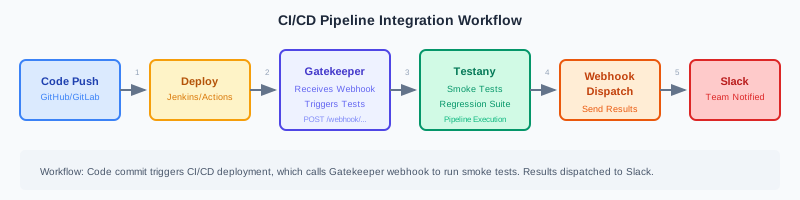
Fire-and-Forget Pattern
The fire-and-forget pattern is the simplest integration approach: the CI/CD pipeline triggers tests and immediately continues execution without waiting for results. Test results are delivered asynchronously to the team via Webhook Dispatch.
Implementation with Jenkins:
Using the HTTP Request Plugin ↗:
Groovypipeline { agent any stages { stage('Deploy') { steps { sh 'deploy.sh' } } stage('Trigger Testany Tests') { steps { httpRequest( // International: https://<tenant_name>.testany.io/api/v2/gatekeeper/webhook/... // China: https://<tenant_name>.testany.com.cn/api/v2/gatekeeper/webhook/... url: 'https://<YOUR_TENANT>.testany.io/api/v2/gatekeeper/webhook/YOUR_GATEKEEPER_TOKEN', httpMode: 'POST', contentType: 'APPLICATION_JSON', requestBody: '{"source": "jenkins", "environment": "staging"}' ) } } } }
Implementation with GitHub Actions:
YAMLname: Deploy and Test on: push: branches: [main] jobs: deploy: runs-on: ubuntu-latest steps: - uses: actions/checkout@v4 - name: Deploy to staging run: ./deploy.sh - name: Trigger Testany smoke tests # International URL: https://<tenant_name>.testany.io/... # China URL: https://<tenant_name>.testany.com.cn/... run: | curl -X POST "${{ secrets.TESTANY_BASE_URL }}/api/v2/gatekeeper/webhook/${{ secrets.TESTANY_GATEKEEPER_TOKEN }}" \ -H "Content-Type: application/json" \ -d '{"source": "github-actions", "environment": "staging", "commit": "${{ github.sha }}"}'
Webhook Dispatch Configuration:
Configure webhook dispatch on your Gatekeeper to notify your team in Slack when tests complete. See Managing Testany Notifications for setup details.
Other CI/CD Platforms:
- GitLab CI: Use
curlin your.gitlab-ci.yml - Azure DevOps: Use the InvokeRESTAPI task ↗
- CircleCI: Use the
runstep withcurl
CI/CD Quality Gate Pattern
The examples above use a "fire-and-forget" approach—the pipeline triggers tests and continues without waiting for results. For Quality Gate scenarios where the pipeline should block until tests pass/fail, use Testany's webhook callback mechanism.
How it works:
- Your CI/CD pipeline triggers tests via Gatekeeper
- The pipeline waits for a callback at a specified endpoint
- Testany's Webhook Dispatch sends results to that endpoint when tests complete
- The pipeline proceeds or fails based on the test result
Implementation with Jenkins (Webhook Callback):
Groovypipeline { agent any stages { stage('Deploy') { steps { sh 'deploy.sh' } } stage('Trigger Testany Tests with Quality Gate') { steps { script { // Create a unique callback URL using Jenkins' webhook trigger def callbackUrl = "${env.JENKINS_URL}generic-webhook-trigger/invoke?token=${env.BUILD_TAG}" // Trigger Testany with callback URL in payload httpRequest( url: 'https://<YOUR_TENANT>.testany.io/api/v2/gatekeeper/webhook/YOUR_GATEKEEPER_TOKEN', httpMode: 'POST', contentType: 'APPLICATION_JSON', requestBody: """{"source": "jenkins", "environment": "staging", "callback_id": "${env.BUILD_TAG}"}""" ) } } } stage('Wait for Test Results') { steps { // Wait for webhook callback from Testany // Configure Testany Webhook Dispatch to call back to Jenkins timeout(time: 30, unit: 'MINUTES') { waitForWebhook(hookUrl: 'testany-result-hook') } } } stage('Evaluate Quality Gate') { steps { script { // Parse the webhook payload to determine pass/fail // status: 1 = passed, 2 = failed, 3 = blocked def testStatus = readJSON(text: env.WEBHOOK_PAYLOAD).status if (testStatus != 1) { error("Quality Gate failed: Test status = ${testStatus}") } echo "Quality Gate passed!" } } } } }
Implementation with GitHub Actions (Webhook Callback):
For GitHub Actions, use a combination of repository_dispatch events and a callback endpoint:
YAMLname: Deploy with Quality Gate on: push: branches: [main] jobs: deploy: runs-on: ubuntu-latest steps: - uses: actions/checkout@v4 - name: Deploy to staging run: ./deploy.sh - name: Trigger Testany smoke tests run: | curl -X POST "${{ secrets.TESTANY_BASE_URL }}/api/v2/gatekeeper/webhook/${{ secrets.TESTANY_GATEKEEPER_TOKEN }}" \ -H "Content-Type: application/json" \ -d '{"source": "github-actions", "environment": "staging", "run_id": "${{ github.run_id }}"}' - name: Wait for test results id: wait-for-results uses: peter-evans/wait-for-check@v3 with: token: ${{ secrets.GITHUB_TOKEN }} sha: ${{ github.sha }} check-name: 'testany-quality-gate' timeout: 1800 # 30 minutes - name: Quality Gate Decision run: | if [ "${{ steps.wait-for-results.outputs.conclusion }}" != "success" ]; then echo "Quality Gate failed!" exit 1 fi echo "Quality Gate passed!"
Webhook Dispatch Configuration for Quality Gate:
Configure your Gatekeeper's webhook dispatch to call back to your CI/CD system:
- Navigate to your Gatekeeper's Result notification section
- Add a webhook dispatch pointing to your CI/CD callback endpoint:
- Jenkins: Use the Generic Webhook Trigger plugin URL
- GitHub Actions: Use a GitHub App webhook or
repository_dispatchendpoint - GitLab CI: Use pipeline trigger token URL
- The webhook payload includes
statusfield (1=passed, 2=failed, 3=blocked)
Payload Status Values:
| Status | Meaning | Quality Gate Action |
|---|---|---|
| 1 | Passed | Proceed with pipeline |
| 2 | Failed | Block/fail the pipeline |
| 3 | Blocked | Block/fail the pipeline |
For complete payload structure, see Understanding the Payload of a Notification Webhook.
Testany uses webhook callbacks for synchronous waiting. There is no polling API for execution status—your CI/CD system must wait for the webhook callback instead of repeatedly checking for results.
Scenario 2: Monitoring System Integration
Use Case: When monitoring detects anomalies (error rate spikes, latency increases), automatically trigger diagnostic tests to help identify issues quickly.
Flow: Monitoring Alert → Gatekeeper Webhook → Diagnostic Tests → Webhook Dispatch → Incident Management
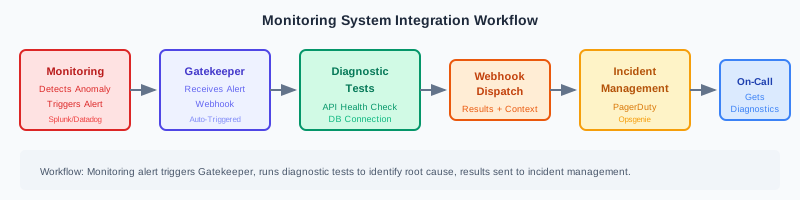
Implementation with Splunk:
-
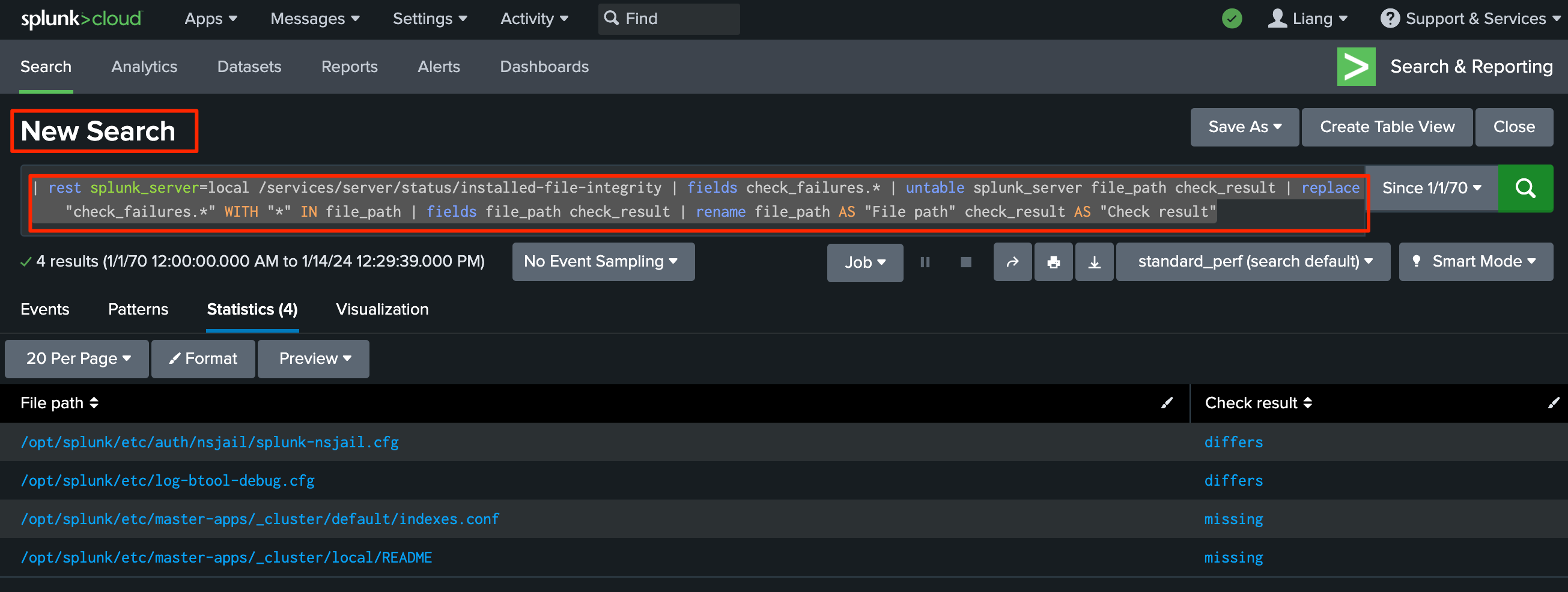
Create your business query in Splunk that detects the anomaly condition.
-
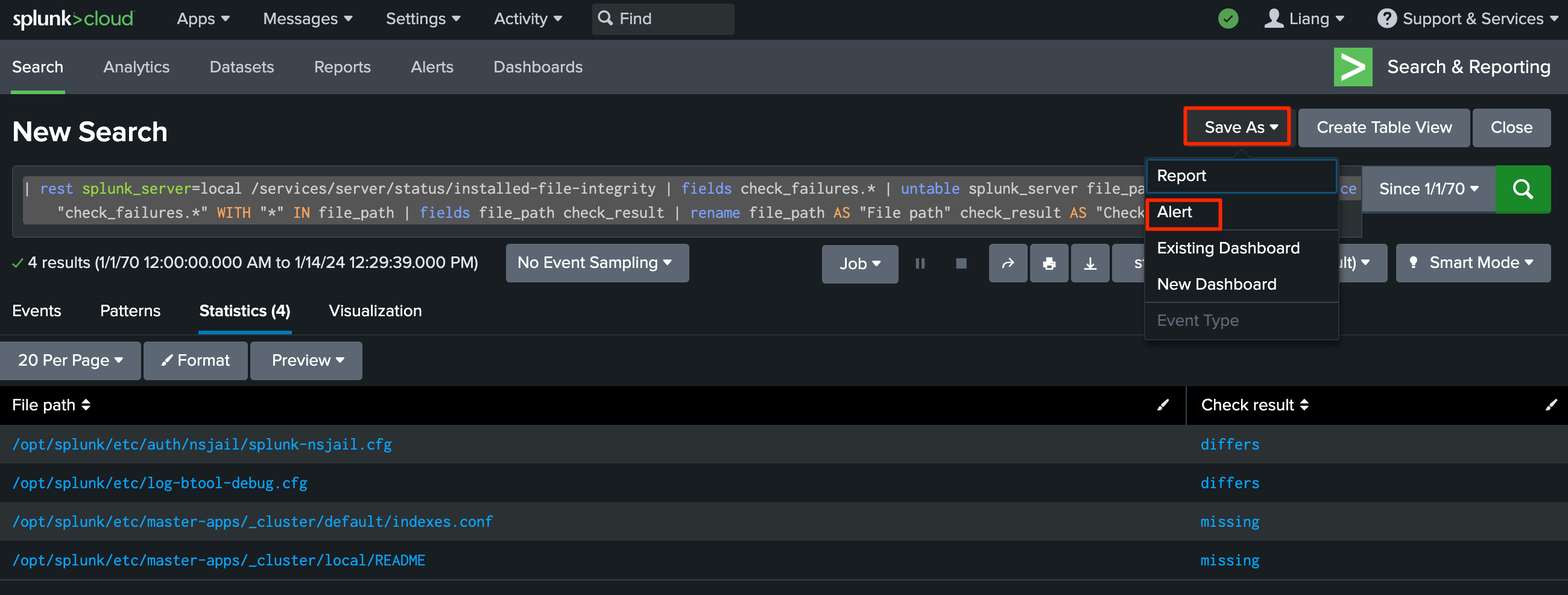
Save the search as an alert with appropriate trigger conditions.
-
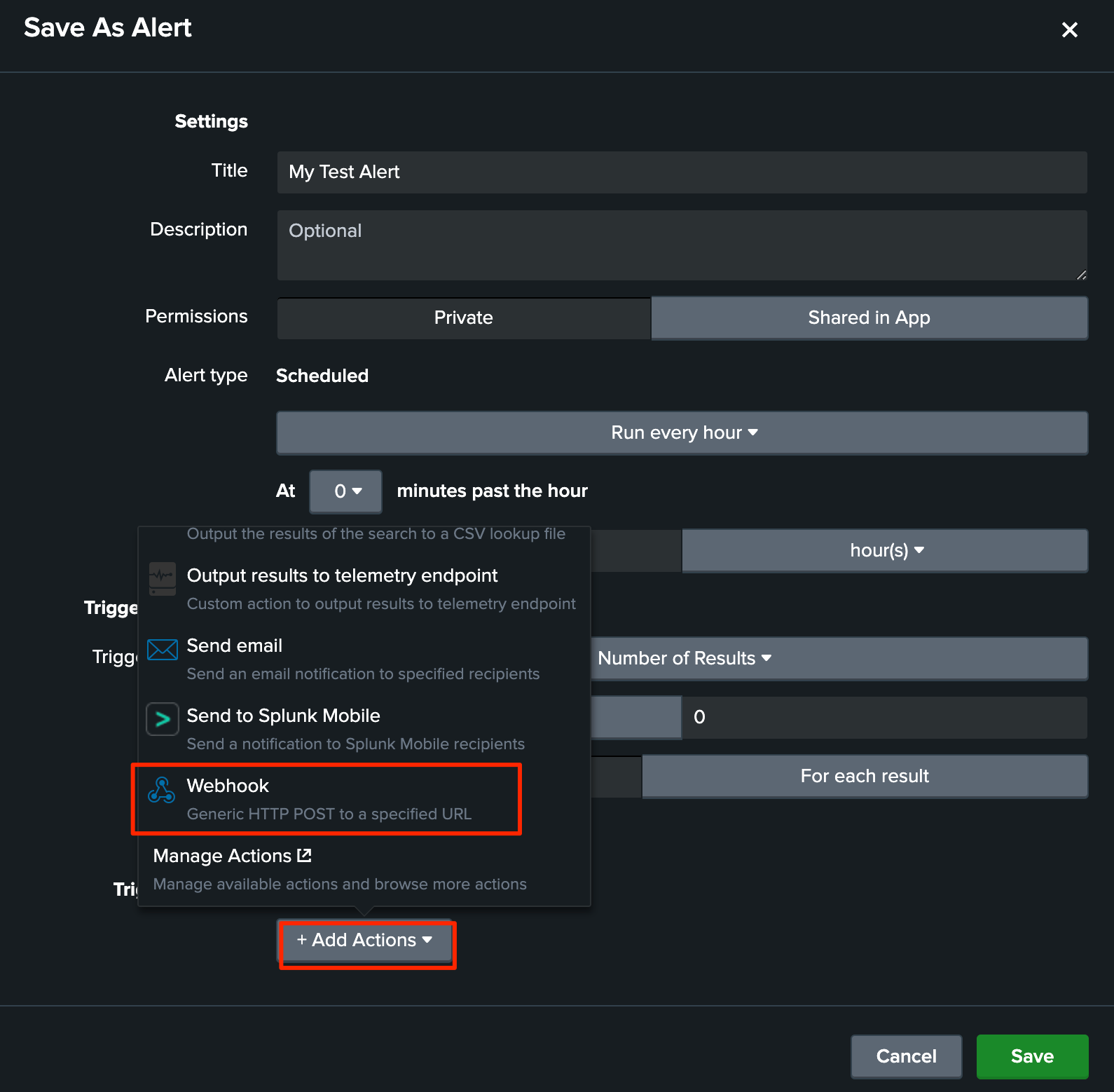
Configure the alert action to use Webhook, pasting your Testany Gatekeeper URL.
-
Save and enable the alert.
Webhook Dispatch Configuration:
Configure webhook dispatch to send test results to PagerDuty or your incident management system. When tests identify the root cause, responders get immediate diagnostic information.
Other Monitoring Platforms:
- Datadog: Webhooks Integration ↗
- Dynatrace: Problem Notifications - Webhook ↗
- Prometheus + Alertmanager: Webhook Config ↗
- New Relic: Use webhook notification channels
Scenario 3: Scheduled Regression with Escalation
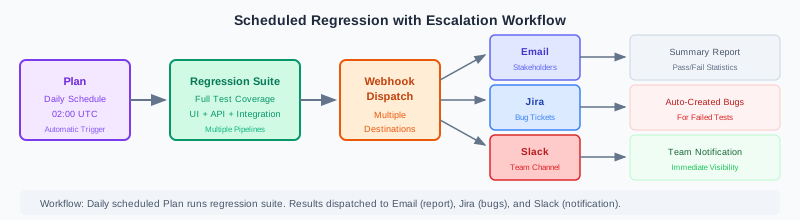
Use Case: Run comprehensive regression tests on a daily schedule with automatic escalation when failures occur.
Flow: Plan Schedule → Regression Suite → Webhook Dispatch → [Email + Jira + Slack]
Implementation:
-
Create a Plan in Testany with daily schedule (e.g., 2:00 AM UTC)
-
Add regression test pipelines to the Plan
-
Configure multiple webhook dispatch endpoints:
- Slack: Team notification channel for immediate visibility
- Jira: Auto-create bug tickets for failures (using Jira's webhook-to-issue automation)
- Email: Summary to stakeholders
Plan Configuration:
Navigate to Plan → Create Plan and configure:
- Schedule: Daily at 02:00 UTC
- Pipelines: Select your regression test pipelines
- Notifications: Configure webhook dispatch for each destination
See Manage Test Trigger Methods - Plan Trigger for detailed setup instructions.
Webhook Payload Processing:
Your downstream systems can parse the webhook payload to take appropriate actions. For example, a Jira automation rule can:
- Create a bug if
status === 2(failure) - Include failed test case names in the description
- Assign to the pipeline owner
See Understanding the Payload of a Notification Webhook for payload structure details.
Scenario 4: ChatOps-Driven Testing (Planned)
This feature is currently in planning. If you're interested in native ChatOps integration, please contact our product team to submit a feature request.
Vision: Enable team members to trigger tests via Slack/Teams commands without logging into Testany.
Expected Flow: Slack Command → Gatekeeper Webhook → API Tests → Webhook Dispatch → Slack Results
Current Workarounds:
Until native ChatOps integration is available, you can achieve similar functionality through:
-
Slack Workflow Builder + Webhook:
- Create a Slack Workflow with a trigger (e.g., emoji reaction or shortcut)
- Add a "Send Webhook" step that calls your Testany Gatekeeper URL
- Team members can trigger tests through simple Slack actions
-
External Automation Tools:
- Connect Slack to Testany using Zapier, Make (Integromat), or n8n
- Configure trigger conditions and webhook calls
-
Custom Bot:
- Develop a custom Slack/Teams bot that listens for specific commands
- Have the bot call Testany Gatekeeper webhooks when commands are received
Scenario 5: Third-Party Dependency Monitoring
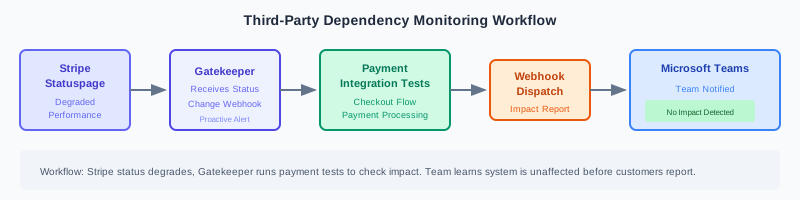
Use Case: When a third-party service (payment gateway, SMS provider, cloud storage) experiences issues, automatically run integration tests to assess impact on your system.
Flow: Statuspage Alert → Gatekeeper Webhook → Integration Tests → Webhook Dispatch → Teams Notification
Implementation with Statuspage:
-
Create a Gatekeeper in Testany configured with integration test pipelines for the third-party service
-
Log in to the service's Statuspage (e.g., Stripe Status ↗)
-
Add a webhook subscriber:
- Go to Subscribers → Webhook Subscribers → Add Subscriber
- Endpoint URL: Paste your Gatekeeper Webhook URL
- Components: Select components to monitor
-
Configure Webhook Dispatch to notify your team via Microsoft Teams
Common Third-Party Statuspages:
Proactive Impact Assessment:
When Stripe reports degraded performance, your payment integration tests run automatically. Your team learns whether your system is affected before customers report issues.
Implementation Guide
Setting Up Gatekeeper
- Navigate to your workspace → Gatekeeper section
- Click Create Gatekeeper and provide a name
- Copy the generated Webhook URL
- Add test pipelines to trigger
- Configure webhook dispatch for result notifications
- Document the trigger conditions for team reference
For detailed setup instructions, see Manage Test Trigger Methods - Gatekeeper Trigger.
Configuring Plan
- Navigate to your workspace → Plan section
- Click Add Plan and provide a name
- Configure the schedule (time, recurrence pattern)
- Select test pipelines to execute
- Configure webhook dispatch for result notifications
- Review upcoming executions to verify schedule
For detailed setup instructions, see Manage Test Trigger Methods - Plan Trigger.
Setting Up Webhook Dispatch
Both Plan and Gatekeeper support webhook dispatch configuration:
- Open your Plan or Gatekeeper detail page
- Navigate to Result notification section
- Click Webhook dispatch tab
- Click + to add a new webhook
- Provide:
- Application name (e.g., "Slack", "Jira")
- Webhook name for identification
- Webhook URL from your destination system
- Save the configuration
For detailed setup instructions, see Managing Testany Notifications.
For payload structure details, see Understanding the Payload of a Notification Webhook.
Advanced Patterns
Cascading Test Chains
Connect multiple testing stages by using webhook dispatch from one trigger to activate another Gatekeeper:
Example: Deploy → Smoke → Full Regression
- Gatekeeper A: Receives deploy webhook, runs smoke tests
- Webhook Dispatch A: On success, calls Gatekeeper B
- Gatekeeper B: Runs full regression suite
- Webhook Dispatch B: Notifies team of final results
This pattern enables progressive testing where expensive regression suites only run after smoke tests pass.
Multi-Environment Testing
Configure multiple Gatekeepers for different environments:
- Gatekeeper-Staging: Triggers staging tests, uses staging credentials
- Gatekeeper-Production: Triggers production tests, uses production credentials
Your CI/CD pipeline calls the appropriate Gatekeeper based on deployment target.
Conditional Notification Routing
Use webhook dispatch strategically:
- All Results: Send to logging/auditing systems
- Failures Only: Send to PagerDuty/incident management
- Success Only: Send to deployment automation to proceed with next stage
Configure notification preferences per receiver in the webhook dispatch settings.
Best Practices
Gatekeeper Naming Conventions
Use descriptive names that indicate the trigger source and test purpose:
cicd-staging-smoke- Triggered by CI/CD for staging smoke testsmonitor-api-diagnostic- Triggered by monitoring for API diagnosticsstatuspage-payment-check- Triggered by third-party statuspage for payment checks
Plan Scheduling Strategies
- Off-peak hours: Schedule resource-intensive tests during low-traffic periods
- Time zones: Consider team locations when scheduling for human review
- Stagger executions: Avoid scheduling multiple heavy plans at the same time
- Buffer time: Allow sufficient time between scheduled plans for completion
Webhook Reliability
- Verify URLs: Test webhook endpoints before production use
- Monitor delivery: Check webhook dispatch logs for failures
- Implement retries: Testany retries failed webhooks 3 times
- Handle timeouts: Webhooks timeout after 15 seconds—ensure endpoints respond quickly
Documentation and Maintenance
- Document trigger conditions: Record what events trigger each Gatekeeper
- Review periodically: Audit Plans and Gatekeepers quarterly
- Update pipelines: Keep triggered pipelines aligned with current testing needs
- Archive unused: Delete Gatekeepers/Plans no longer needed
Troubleshooting
Common Issues
| Issue | Possible Cause | Solution |
|---|---|---|
| Gatekeeper not triggering | Invalid webhook URL | Verify URL is correctly copied |
| Firewall blocking | Check network rules allow Testany IPs | |
| Plan not executing | Incorrect schedule | Verify timezone and cron expression |
| Webhook dispatch failing | Invalid endpoint URL | Test URL with manual POST request |
| Endpoint timeout | Ensure endpoint responds within 15s | |
| SSL certificate issues | Verify certificate chain is valid |
Debugging Steps
- Check Gatekeeper/Plan logs: Review execution history in Testany
- Test webhooks manually: Use curl to verify endpoint connectivity
- Review payload format: Ensure downstream systems parse JSON correctly
- Check permissions: Verify Gatekeeper/Plan owner has required access
Quick Reference
Key URLs
| Resource | URL Pattern |
|---|---|
| Gatekeeper Webhook (International) | https://<tenant_name>.testany.io/api/v2/gatekeeper/webhook/{TOKEN} |
| Gatekeeper Webhook (China) | https://<tenant_name>.testany.com.cn/api/v2/gatekeeper/webhook/{TOKEN} |
Replace <tenant_name> with your tenant name and {TOKEN} with your Gatekeeper webhook token (hook token), not the Gatekeeper key.
Related Documentation
- Manage Test Trigger Methods - Gatekeeper Trigger - Complete Gatekeeper setup guide
- Manage Test Trigger Methods - Plan Trigger - Plan configuration details
- Managing Test Pipeline - Pipeline configuration
- Managing Testany Notifications - Webhook dispatch setup
- Understanding the Payload of a Notification Webhook - Payload structure
Summary
Testany's event-driven testing ecosystem combines Gatekeeper (webhook-in), Plan (scheduled), and Webhook Dispatch (webhook-out) to create fully automated testing workflows. This approach transforms testing from a manual gate into an intelligent system that:
- Responds to real-world events, not just code changes
- Integrates with your existing DevOps toolchain
- Distributes results to any downstream system
- Operates continuously without manual intervention
Start with a single integration—CI/CD post-deployment testing is often the easiest first step—and expand your event-driven testing strategy as you see the benefits of automated, responsive quality assurance.
Still have questions?
Our team is here to help. Get in touch and we'll get back to you as soon as possible.