
Test Pipeline Writing Guideline and Samples
The Test Pipeline is one of the most important elements on the Testany Platform. Efficient use and maintenance of the Test Pipeline can significantly enhance your automation testing efficiency as well as improve the accuracy and efficiency of troubleshooting.
Note: The voice in this video is AI-generated, not original.
Preparation:
Pipeline is used to orchestrate test cases. Each test case registered in Testany will have a unique case key , you can use these keys to build your pipeline.
You can get the related Test Case Key from Test Case Library
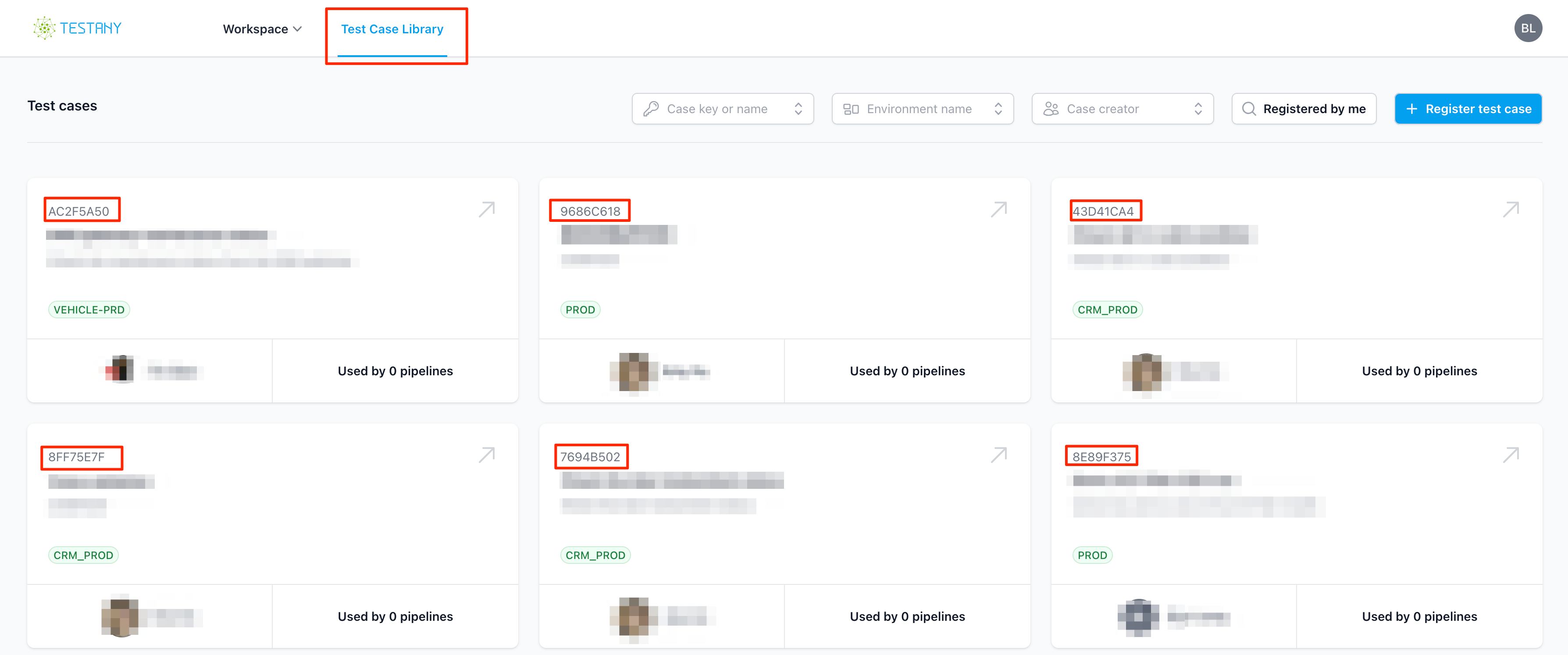
In this example, you have 6 different test cases. And we'll use 4 of them, which the keys are: AC2F5A50, 9686C618 , 43D41CA4 and 8FF75E7F
Get to know Pipeline YAML
In the Testany platform, a pipeline expresses the logical relationships and other execution factors between test cases. For new pipelines today, it is more useful to think of the pipeline as an execution graph: rules with dependencies advance conditionally, while sibling rules without explicit dependencies can be scheduled in parallel by the platform. YAML is used as the authoring format because it is easy to read, maintain, and version.
Write Pipeline yaml file
On the Testany Platform, we use YAML files with a predefined syntax format to define pipelines, which we also refer to as Pipeline Orchestration. For all new pipelines, use rule/v1.3. rule/v1.2 remains compatible for existing pipelines, but it does not provide case-level parallel execution.
The recommendation for new pipelines is explicit:
- Use
rule/v1.3for all new pipelines - Keep existing
rule/v1.2pipelines as they are if you only need backward compatibility - Default concurrency in
rule/v1.3depends on instance type: Community Edition defaults to2, paid Community users default to4, and Enterprise Edition defaults to8
For pipeline orchestration, follow the syntax below (recommended in rule/v1.3):
run: defined execute which Test CasewhenPassed: defined a condition, means when Test Case<TEST-CASE-KEY>executed withPassedstatus, then invokerundefined test casewhenFailed: defined a condition, means when Test Case<TEST-CASE-KEY>executed withFailedstatus, then invokerundefined test caseexpect: fail: this used for change test case execution status. For pipeline execution status definition, all the executed test case execution status withPassed, then pipeline execution status isPassed, otherwise, the pipeline execution status isFailed. If some test case which executed status isFailed, and theFailedstatus is expected, you want to change it asPassedto make pipeline execution status withSuccess, you can use this.relay: a test case with this attribute can pass the value of its pre-declared variable(s) as input to other cases within the same pipeline after it finishes. Bothrule/v1.2andrule/v1.3support relay, butrule/v1.3is the recommended version for all new pipelines.
YAMLkind: rule/v1.3 spec: rules: - run: <TEST-CASE-KEY> - whenPassed: <TEST-CASE-KEY> run: <TEST-CASE-KEY> - whenFailed: <TEST-CASE-KEY> run: <TEST-CASE-KEY> - whenFailed: <TEST-CASE-KEY> run: <TEST-CASE-KEY>
In this case, the pipeline.yaml should be:
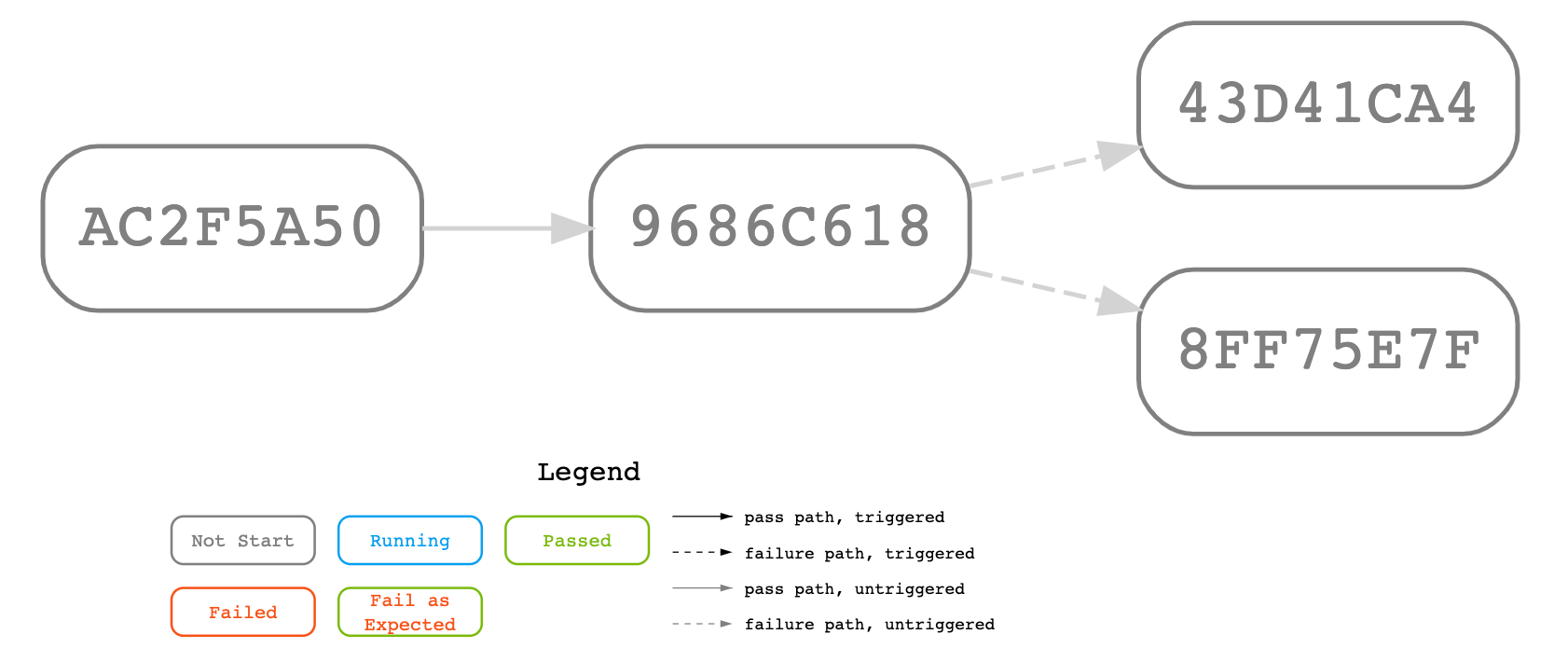
YAMLkind: rule/v1.3 spec: rules: - run: AC2F5A50 - whenPassed: AC2F5A50 run: 9686C618 - whenFailed: 9686C618 run: 43D41CA4 - whenFailed: 9686C618 run: 8FF75E7F
That means
Plain Textinvoke AC2F5A50 if AC2F5A50 executed with Passed result then invoke 9686C618 if 9686C618 executed with Failed result then invoke 43D41CA4 invoke 8FF75E7F else pipeline completed else pipeline completed
Pipeline Flow Diagram:
Rules of Pipeline Execution Result
When the pipeline is orchestrated and executed, it will generate a Pipeline Execution Status. For detailed definitions of the statuses and the conditions under which they appear, please refer
In relation to the example above: if AC2F5A50 executed with Passed, and 9686C628 executed with Passed then pipeline status is Success, otherwise the pipeline status would be Failure .
In our actual testing work, there is a relatively special situation where we know very clearly that a particular test case will result in a Failed outcome, and this result is expected (for example, when the test script is ready before the code being tested). For this situation, Testany specifically provides a syntax: expect: fail.
For example, in below yaml, you know 9686C618 will be executed with Failed and that Failed is expected, so apparently you want to pipeline execution status with Success even 9686C618 is Failed, you can add expect: fail after run:9686C618 (line 7):
YAMLkind: rule/v1.3 spec: rules: - run: AC2F5A50 - whenPassed: AC2F5A50 run: 9686C618 expect: fail - whenFailed: 9686C618 run: 43D41CA4 - whenFailed: 9686C618 run: 8FF75E7F
Trigger Condition Selection Guide
Use the following decision tree to choose the appropriate trigger condition for your pipeline:

Common Scenarios:
| Business Scenario | Configuration | Example |
|---|---|---|
| Sequential API calls | whenPassed | Login → Create Order → Get Order |
| Cleanup after test (always run) | No condition | Test → Cleanup Data |
| Negative testing (expect failure) | expect: fail on the case, whenPassed on follower | Test Invalid Input → Next Test |
| Conditional branch on failure | whenFailed | Main Flow fails → Run Fallback |
Key Points:
whenPassed: Execute when the referenced case reports Passed to the pipelinewhenFailed: Execute when the referenced case reports Failed, Aborted, or Timeout to the pipelineexpect: fail: The case always reports Passed to the pipeline, regardless of actual result. UsewhenPassed(notwhenFailed) to follow such a case.- No condition: In
rule/v1.3, this means there is no explicit dependency between those rules, so the platform can schedule them in parallel up to the concurrency available to the current workspace. Inrule/v1.2, the same shape still follows legacy serial semantics.
How rule/v1.3 Parallel Scheduling Works
rule/v1.3expresses dependency semantics, not a guarantee that every ready case starts at exactly the same moment.- When multiple cases become ready at the same time, the platform starts them up to the concurrency available to the current workspace.
- If more cases are ready than the current workspace can start immediately, the extra cases wait in queue and are started later as slots are refilled, following YAML order.
- If a downstream case depends on relay output, make sure the test script that provides relay data can clearly finish before the test script that consumes relay data starts. Do not model relay dependencies on sibling branches that could become ready together.
Pipeline examples:
Let's use a few examples to further illustrate how to orchestrate a pipeline that meets testing requirements and business logic, making your automated testing more accurate and efficient.
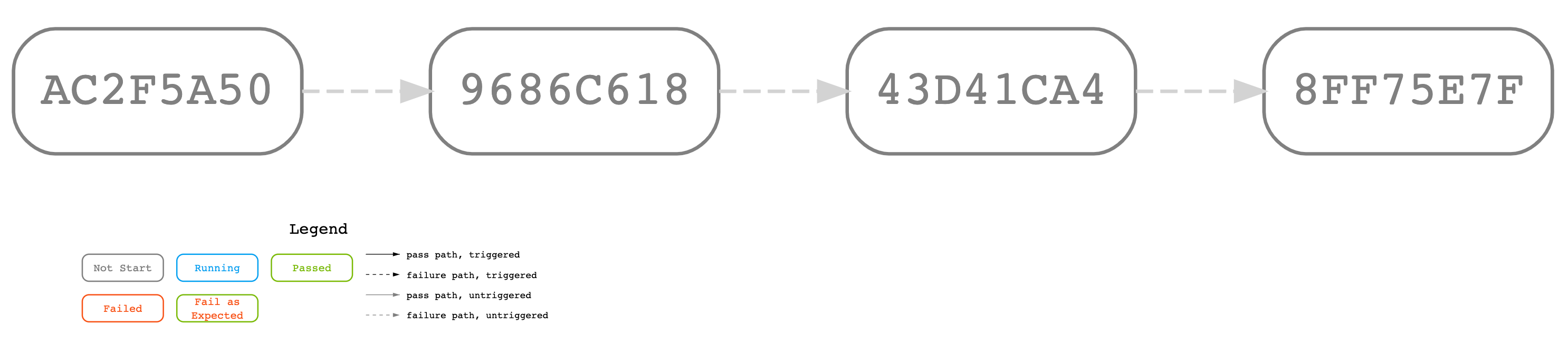
Sample A (valid): run single case with whenFailed
Scenario: "When the previous case fails, execute the next case."
Pipeline Yaml:
YAMLkind: rule/v1.3 spec: rules: - run: AC2F5A50 - whenFailed: AC2F5A50 run: 9686C618 - whenFailed: 9686C618 run: 43D41CA4 - whenFailed: 43D41CA4 run: 8FF75E7F
Flow diagram
Sample B (valid): run single case with whenPassed
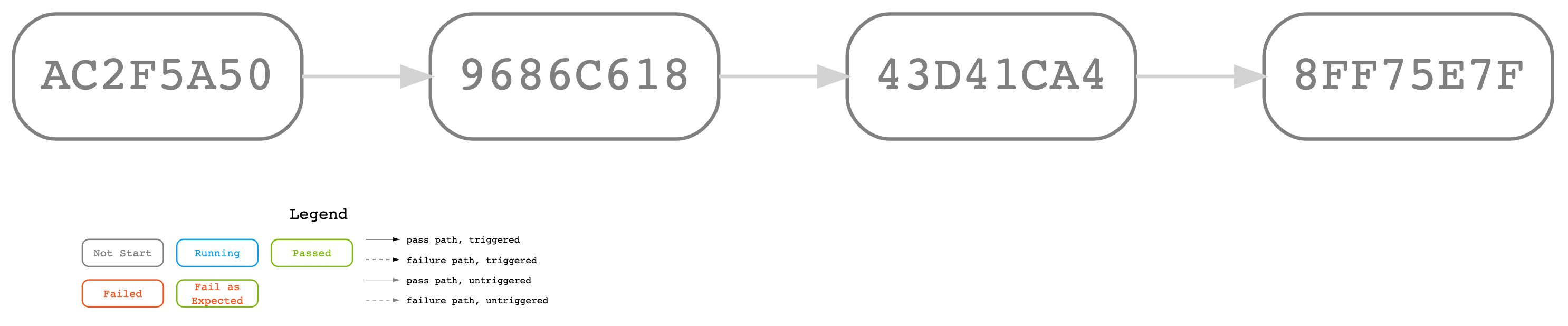
Scenario: "When the previous case pass, execute the next case."
Pipeline Yaml:
YAMLkind: rule/v1.3 spec: rules: - run: AC2F5A50 - whenPassed: AC2F5A50 run: 9686C618 - whenPassed: 9686C618 run: 43D41CA4 - whenPassed: 43D41CA4 run: 8FF75E7F
Flow diagram
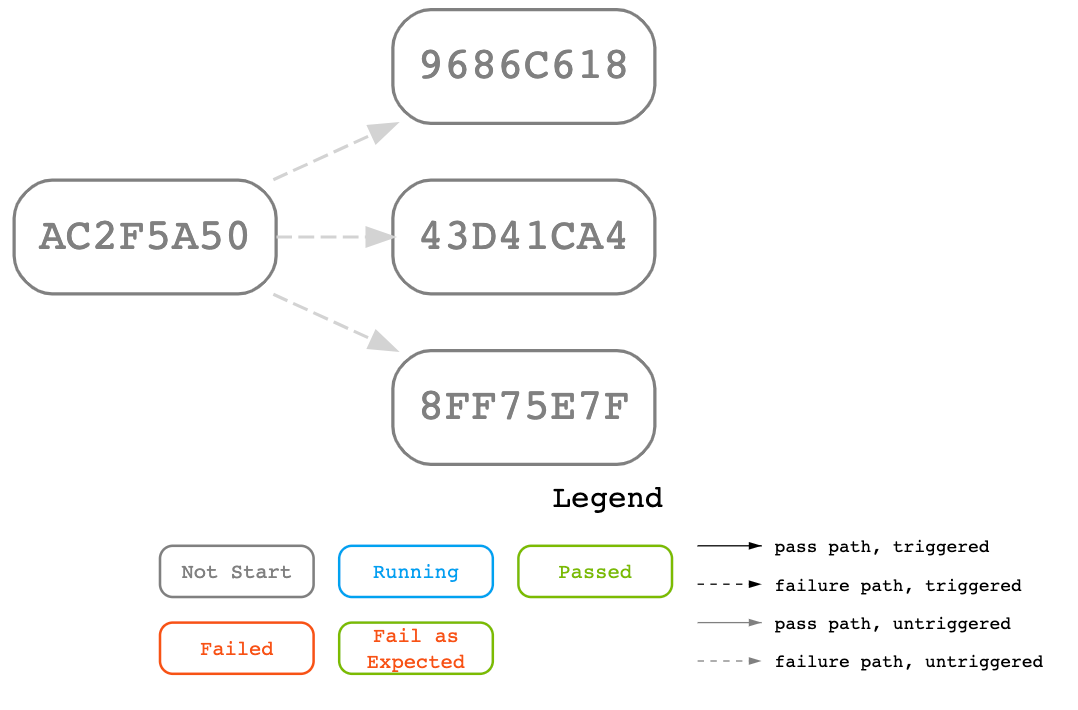
Sample C (valid): run multi-cases with whenFailed
Scenario: "When the previous case failed, execute the next 3 cases."
Pipeline Yaml:
YAMLkind: rule/v1.3 spec: rules: - run: AC2F5A50 - whenFailed: AC2F5A50 run: 9686C618 - whenFailed: AC2F5A50 run: 43D41CA4 - whenFailed: AC2F5A50 run: 8FF75E7F
Flow diagram
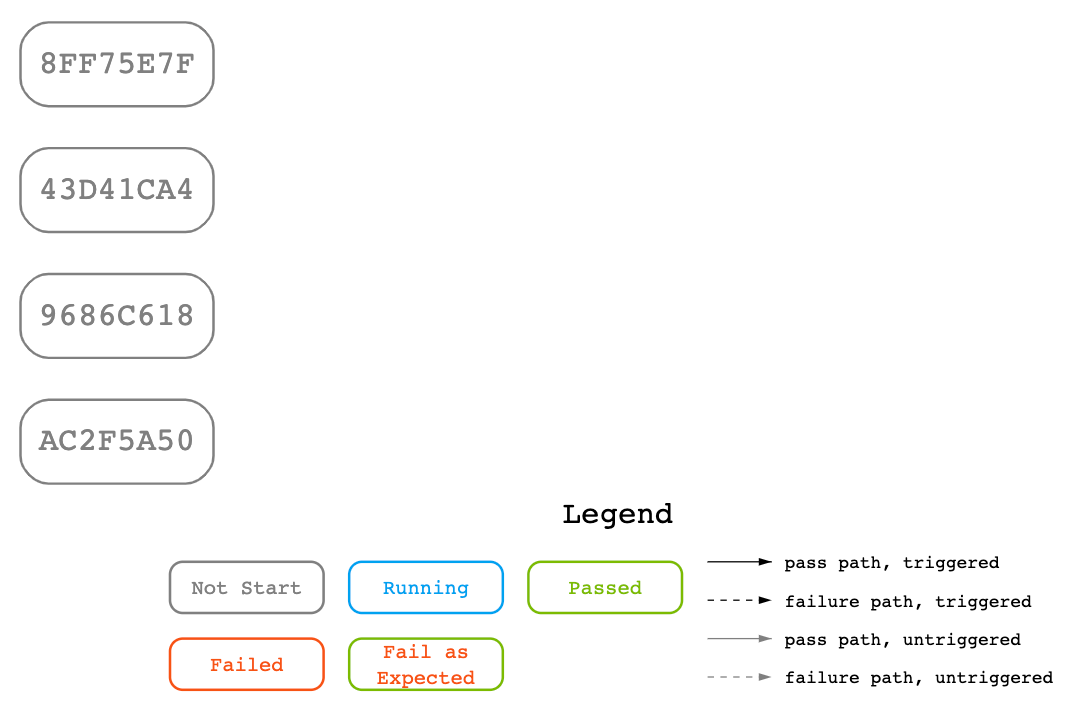
Sample D (valid): run without condition
Scenario: "These four cases have no explicit dependency. In rule/v1.3, they are semantically parallel-capable. If the current workspace has fewer available slots than ready cases, the platform refills execution in YAML order."
Pipeline Yaml:
YAMLkind: rule/v1.3 spec: rules: - run: AC2F5A50 - run: 9686C618 - run: 43D41CA4 - run: 8FF75E7F
Flow diagram:
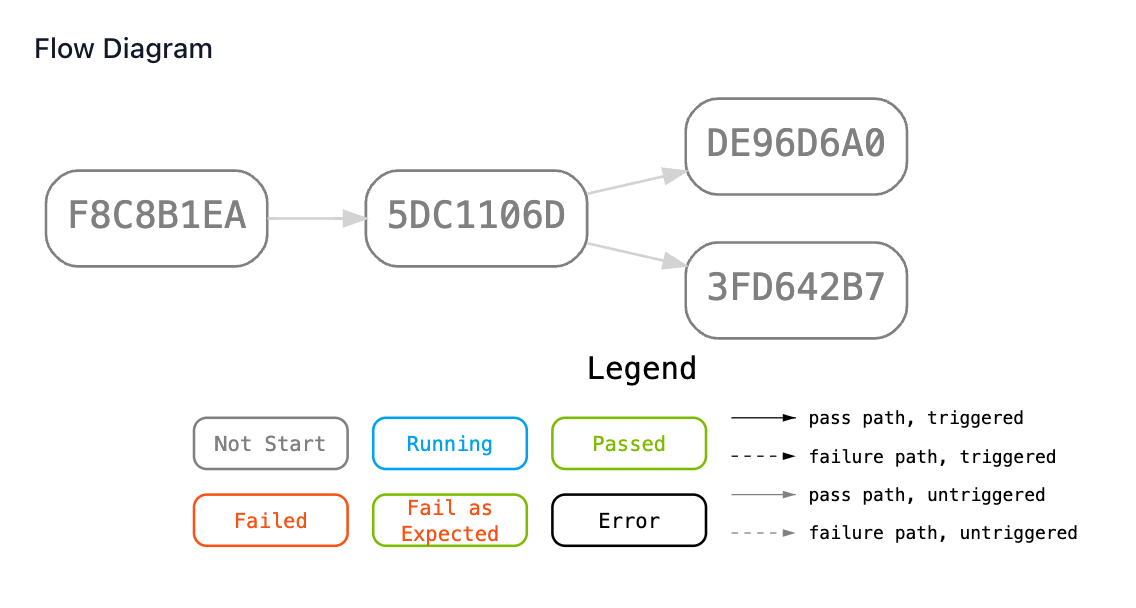
Sample E (valid): run with relay + whenPassed
Scenario: "This is a standard and valid output relay sample. Case DE96D6A0 get ACCESS_TOKEN from case 5DC1106D, case 3FD642B7 also get ACCESS_TOKEN from 5DC1106D. Output relay is from 5DC1106D to DE96D6A0, and from 5DC1106D to 3FD642B7."
Pipeline Yaml:
YAMLkind: rule/v1.3 spec: rules: - run: F8C8B1EA - whenPassed: F8C8B1EA run: 5DC1106D - whenPassed: 5DC1106D run: DE96D6A0 relay: - key: ACCESS_TOKEN # Define an environment variable 'ACCESS_TOKEN' for case 'DE96D6A0' refKey: 5DC1106D/ACCESS_TOKEN # Set case 'DE96D6A0's 'ACCESS_TOKEN' equal to case '5DC1106D's 'ACCESS_TOKEN' - whenPassed: 5DC1106D run: 3FD642B7 relay: - key: ACCESS_TOKEN # Define an environment variable 'ACCESS_TOKEN' for case '3FD642B7' refKey: 5DC1106D/ACCESS_TOKEN # Set case '3FD642B7's 'ACCESS_TOKEN' equal to case '5DC1106D's 'ACCESS_TOKEN' - key: STATUS # Define an environment variable 'STATUS' for case '3FD642B7' refKey: F8C8B1EA/STATUS # Set case '3FD642B7's 'STATUS' equal to case 'F8C8B1EA's 'STATUS' nonSecret: true # Set case '3FD642B7's 'STATUS' as non-secret (its value can be printed out in log)
Flow diagram:
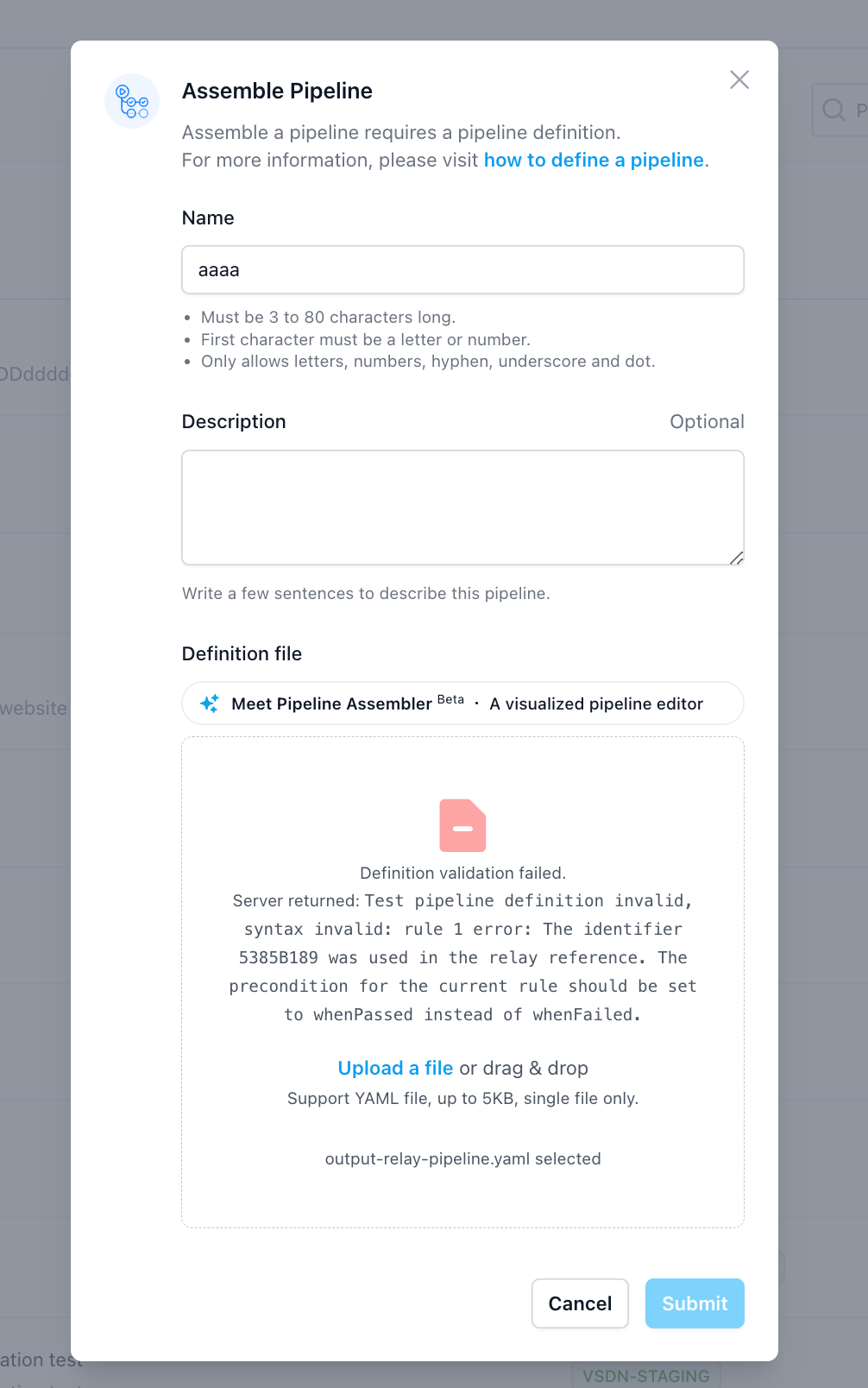
Sample F (invalid): run with both relay and whenFailed
Scenario: "User defines in the YAML that case B both Relays case A and includes whenfailed: A, the system would consider the YAML as invalid."
Pipeline Yaml:
YAMLkind: rule/v1.3 spec: rules: - run: 5385B189 - run: A3D9405F whenFailed: 5385B189 relay: - key: NEW_URL refKey: 5385B189/NEW_URL nonSecret: true - key: AAA refKey: 5385B189/AAA nonSecret: true
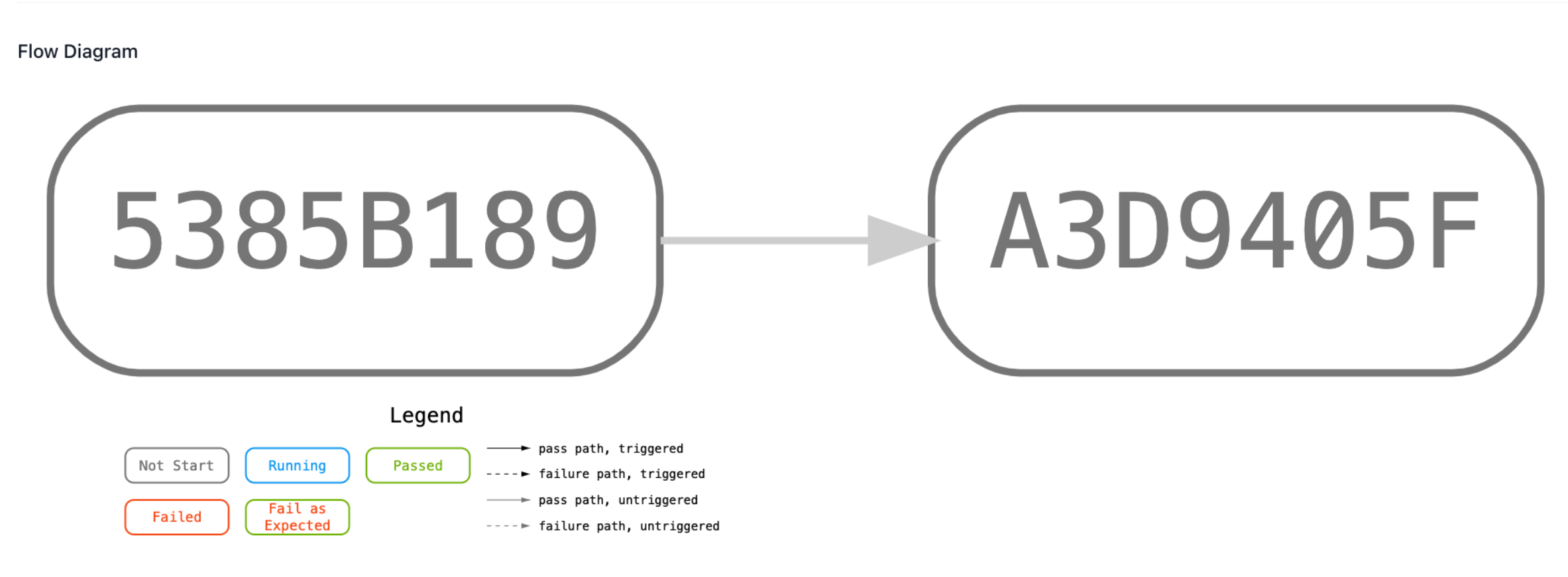
Sample G (valid): run with relay
Scenario: "User explicitly defines in the YAML that B Relays A but does not explicitly declare other whenpassed or whenfailed for B, the system should implicitly add whenpassed: A ."
Pipeline Yaml:
YAMLkind: rule/v1.3 spec: rules: - run: 5385B189 - run: A3D9405F relay: - key: NEW_URL # Define an environment variable 'NEW_URL' for case 'A3D9405F' refKey: 5385B189/NEW_URL # set case 'A3D9405F' 's 'NEW_URL' equal to case '5385B189' 's 'NEW_URL' nonSecret: true - key: AAA # Define an environment variable 'AAA' for case 'A3D9405F' refKey: 5385B189/AAA # set case 'A3D9405F' 's 'AAA' equal to case '5385B189' 's 'AAA' nonSecret: true
Sample H (invalid): relay is not set in case detail
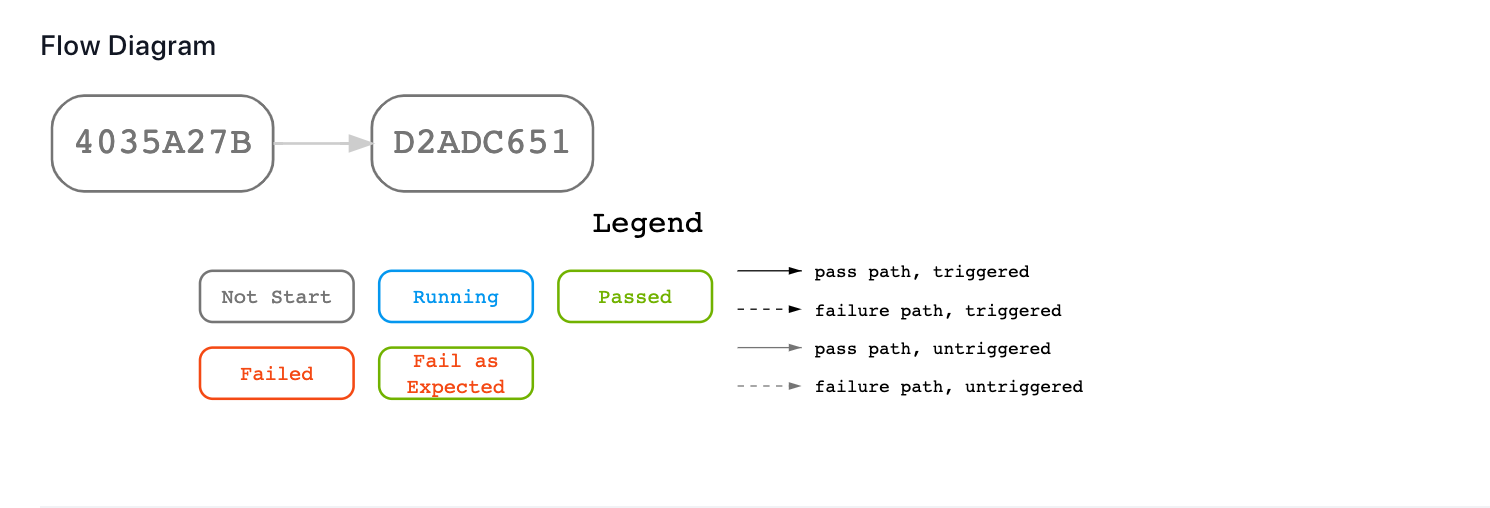
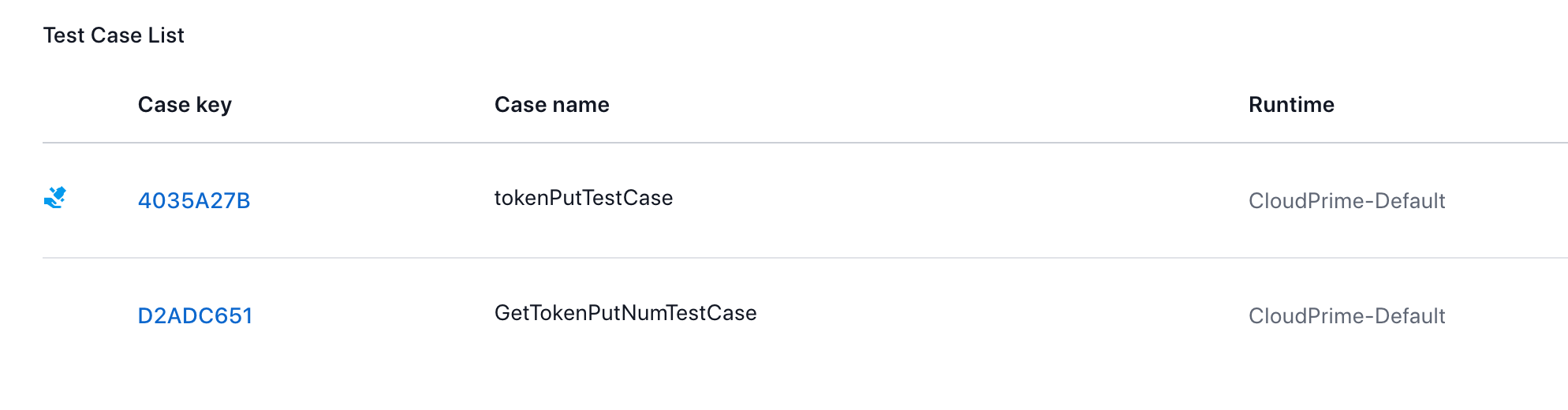
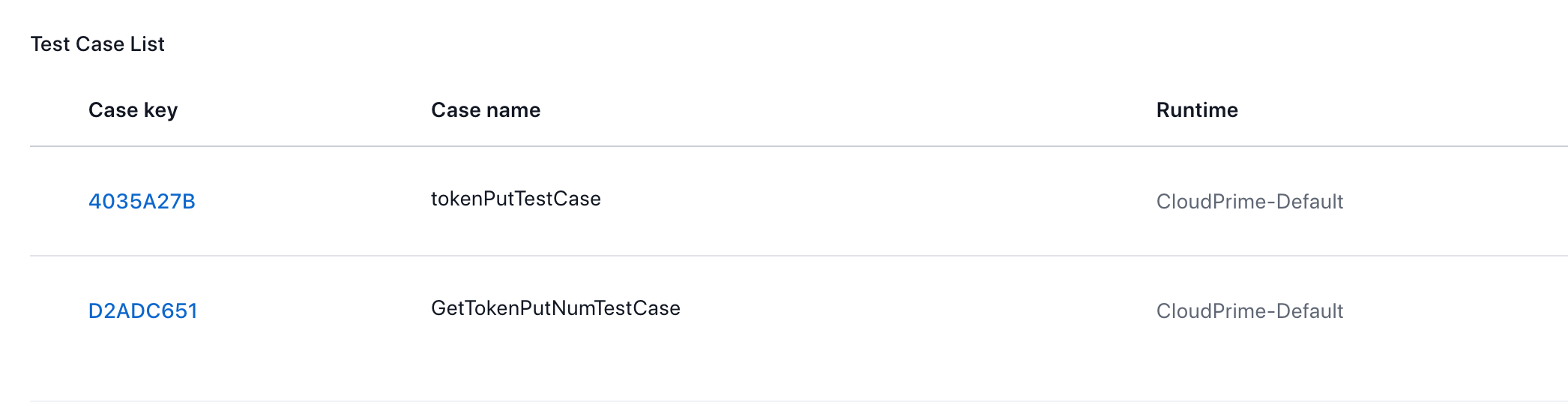
Scenario: "Case B depends on the output of Case A, but Case A does not declared any output. In this case, the system will not reject the configuration, but in the pipeline details page user will not see any test cases marked with the Relay Output Case flag. It reminds user to review the dependency settings."
Pipeline Yaml:
YAMLkind: rule/v1.3 spec: rules: - run: 4035A27B - run: D2ADC651 relay: - key: ACCESS_TOKEN refKey: 4035A27B/ACCESS_TOKEN
Case A with relay configured.
Case A without relay configured.
Sample I (invalid): interdependent cases
Scenario: "Cases that depends on each other in a cycle, in that case the system would consider the YAML as invalid. "
Pipeline Yaml:
YAMLkind: rule/v1.3 spec: rules: - whenPassed: 9D9671B4 run: 714A0A51 - whenPassed: 714A0A51 run: D2ADC651 - whenPassed: D2ADC651 run: 9D9671B4
Still have questions?
Our team is here to help. Get in touch and we'll get back to you as soon as possible.