
Test Case Writing Guidelines and Examples - Python Unittest
Python unittest ↗ is a python unit test framework. Testany support this popular python test framework. This document shows how to writing a python unittest test case in Testany.
Testany test case supported python version is 3.11.5, it should compatible other lower python versions. If a new python version needed for any specific reason, please feel free to contact our Customer Support
Test case package - one zip file
Currently we only support uploading your local zip file to Testany. The zip file should follow this structure:
my-python-test.zip
├── test_api.py          ← Main test file (required)
├── utils.py             ← Helper modules (optional)
└── requirements.txt     ← Dependencies (optional, auto-installed)
Registration settings:
The zip file needs to contain at least one file:
-
Test case code file or files, like
app.pyPythonimport unittest import os class TestStringMethods(unittest.TestCase): def test_upper(self): test_str = os.getenv('TEST_STR') self.assertEqual('foo'.upper(), test_str) def test_isupper(self): self.assertTrue('FOO'.isupper()) self.assertFalse('Foo'.isupper()) def test_split(self): s = os.getenv('SPLIT_STR') #s = 'hello world' self.assertEqual(s.split(), ['hello', 'world']) # check that s.split fails when the separator is not a string with self.assertRaises(TypeError): s.split(2) if __name__ == '__main__': unittest.main()
Environment Variables Configuration
The environment variables used in your code (e.g., TEST_STR, SPLIT_STR) must be configured in both places:
- Test Case detail page → Environment Variables section: Define the variable name and value
- Test script code: Use
os.getenv('VARIABLE_NAME')to read the value
See Managing Test Case for how to configure environment variables on the platform.
-
requirements.txtfile if your python script use some specific libraries, you can create arequirements.txtfile in your root folder, Testany will auto download these libraries in python execute environment.requirements.txtexamplePlain Textrequests
zip all the related files as one zip file, in this case the test case package file is python-test.zip
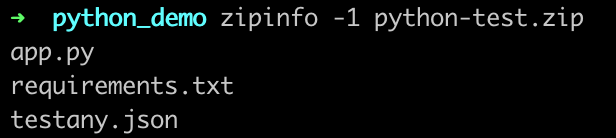
After you've successfully prepared the .zip file, you will be able to go to register your test case on Testany Platform. Please refer to
×
Still have questions?
Our team is here to help. Get in touch and we'll get back to you as soon as possible.